<?xml version="1.0" encoding="utf-8"?><feed xmlns="http://www.w3.org/2005/Atom" ><generator uri="https://jekyllrb.com/" version="4.4.1">Jekyll</generator><link href="https://www.beardmonkey.eu/feed.xml" rel="self" type="application/atom+xml" /><link href="https://www.beardmonkey.eu/" rel="alternate" type="text/html" /><updated>2026-04-23T12:47:43+00:00</updated><id>https://www.beardmonkey.eu/feed.xml</id><title type="html">BeardMonkey</title><subtitle>The personal site of Robert Baarda a.k.a BeardMonkey. A software engineer, nerd and father. Likes programming, gaming, comics etc.</subtitle><author><name>Robert Baarda</name></author><entry><title type="html">Bridging log4net to OpenTelemetry: Why and How</title><link href="https://www.beardmonkey.eu/logging/opentelemetry/otlp/log4net/2026/03/05/bridging-log4net-to-opentelemetry-why-and-how.html" rel="alternate" type="text/html" title="Bridging log4net to OpenTelemetry: Why and How" /><published>2026-03-05T15:15:00+00:00</published><updated>2026-03-05T15:15:00+00:00</updated><id>https://www.beardmonkey.eu/logging/opentelemetry/otlp/log4net/2026/03/05/bridging-log4net-to-opentelemetry-why-and-how</id><content type="html" xml:base="https://www.beardmonkey.eu/logging/opentelemetry/otlp/log4net/2026/03/05/bridging-log4net-to-opentelemetry-why-and-how.html"><![CDATA[<h1 id="bridging-log4net-to-opentelemetry-why-and-how">Bridging log4net to OpenTelemetry: Why and How</h1>
<p>We recently faced an interesting challenge at work: we had applications built on log4net that needed to send logs to our new OpenTelemetry-based observability stack. The question wasn’t whether to do it, but how to do it without rewriting half our codebase.</p>

<p>This is the story of why we needed a bridge, why it was the practical choice, and how log4net’s extensibility through custom appenders made it surprisingly straightforward.</p>

<h2 id="the-situation">The Situation</h2>
<p>Picture this: you have multiple applications, some dating back to .NET Framework 4.x days, all using log4net. They work. They’re stable. They’ve been in production for years. The logging statements are scattered throughout the codebase—controllers, services, repositories, utility classes—everywhere.</p>

<p>Now your organization is experimenting with OpenTelemetry. Your new observability platform (Seq, in my local test case) speaks OTLP. Your new services use <code class="language-plaintext highlighter-rouge">Microsoft.Extensions.Logging</code> with OpenTelemetry. Everything is modern and standardized.</p>

<p>Except for those legacy apps.</p>

<h2 id="why-not-just-rewrite">Why Not Just Rewrite?</h2>
<p>The obvious answer is “replace log4net with <code class="language-plaintext highlighter-rouge">ILogger</code>.” But let’s think about what that actually means:</p>

<p><strong>Code Changes Everywhere</strong>: Every file that logs anything needs changes. That’s potentially thousands of files across multiple projects. Each change is a risk of introducing bugs.</p>

<p><strong>Testing Burden</strong>: You need to test every code path that logs. Not just unit tests—you need to make sure logs still flow correctly in production scenarios, error handling works, performance is acceptable.</p>

<p><strong>No Business Value</strong>: You’re changing working code to… do the same thing it already does. Just with a different logging library. Try explaining that ROI to your manager.</p>

<p><strong>Risk vs. Reward</strong>: The risk of breaking something is high. The reward is… different log statements? It’s a tough sell.</p>

<h2 id="why-a-forwarding-appender-made-sense">Why a Forwarding Appender Made Sense</h2>
<p>log4net has always been extensible through appenders. An appender is just a destination for logs—file, database, console, whatever. The beautiful thing is that log4net already handles all the hard parts: collecting logs, buffering, filtering, formatting. It just needs to know where to send them.</p>

<p>So instead of ripping out log4net, we asked: “Can we just teach log4net to speak OpenTelemetry?”</p>

<p>The answer is yes. And it’s cleaner than you might think.</p>

<p><strong>Zero Application Code Changes</strong>: The logging statements stay exactly as they are. <code class="language-plaintext highlighter-rouge">log.Info()</code>, <code class="language-plaintext highlighter-rouge">log.Error()</code>, everything works unchanged.</p>

<p><strong>Configuration-Only Change</strong>: You modify <code class="language-plaintext highlighter-rouge">App.config</code> or <code class="language-plaintext highlighter-rouge">Web.config</code> to add a new appender. That’s it. Deploy, restart, done.</p>

<p><strong>Incremental Migration</strong>: You can add the OTLP appender alongside existing appenders. Logs go to both old and new destinations during transition.</p>

<p><strong>Correlation Built-In</strong>: By tapping into <code class="language-plaintext highlighter-rouge">Activity.Current</code>, we get automatic correlation with distributed traces. This is the real win—logs and traces tied together.</p>

<h2 id="how-log4net-appenders-work">How log4net Appenders Work</h2>
<p>Before diving into the OpenTelemetry specifics, let’s look at how you build a custom log4net appender. It’s actually pretty simple.</p>

<p>Every appender inherits from <code class="language-plaintext highlighter-rouge">AppenderSkeleton</code> and implements one key method: <code class="language-plaintext highlighter-rouge">Append(LoggingEvent loggingEvent)</code>. That’s where your log goes.</p>

<p>Here’s a minimal example:</p>

<div class="language-csharp highlighter-rouge"><div class="highlight"><pre class="highlight"><code><span class="k">using</span> <span class="nn">log4net.Appender</span><span class="p">;</span>
<span class="k">using</span> <span class="nn">log4net.Core</span><span class="p">;</span>

<span class="k">public</span> <span class="k">class</span> <span class="nc">SimpleFileAppender</span> <span class="p">:</span> <span class="n">AppenderSkeleton</span>
<span class="p">{</span>
    <span class="k">public</span> <span class="kt">string</span> <span class="n">FilePath</span> <span class="p">{</span> <span class="k">get</span><span class="p">;</span> <span class="k">set</span><span class="p">;</span> <span class="p">}</span>

    <span class="k">protected</span> <span class="k">override</span> <span class="k">void</span> <span class="nf">Append</span><span class="p">(</span><span class="n">LoggingEvent</span> <span class="n">loggingEvent</span><span class="p">)</span>
    <span class="p">{</span>
        <span class="kt">var</span> <span class="n">message</span> <span class="p">=</span> <span class="s">$"</span><span class="p">{</span><span class="n">loggingEvent</span><span class="p">.</span><span class="n">TimeStamp</span><span class="p">:</span><span class="n">yyyy</span><span class="p">-</span><span class="n">MM</span><span class="p">-</span><span class="n">dd</span> <span class="n">HH</span><span class="p">:</span><span class="n">mm</span><span class="p">:</span><span class="n">ss</span><span class="p">}</span><span class="s"> [</span><span class="p">{</span><span class="n">loggingEvent</span><span class="p">.</span><span class="n">Level</span><span class="p">}</span><span class="s">] </span><span class="p">{</span><span class="n">loggingEvent</span><span class="p">.</span><span class="n">RenderedMessage</span><span class="p">}</span><span class="s">"</span><span class="p">;</span>
        <span class="n">File</span><span class="p">.</span><span class="nf">AppendAllText</span><span class="p">(</span><span class="n">FilePath</span><span class="p">,</span> <span class="n">message</span> <span class="p">+</span> <span class="n">Environment</span><span class="p">.</span><span class="n">NewLine</span><span class="p">);</span>
    <span class="p">}</span>
<span class="p">}</span>
</code></pre></div></div>

<p>And you configure it in <code class="language-plaintext highlighter-rouge">App.config</code>:</p>

<div class="language-xml highlighter-rouge"><div class="highlight"><pre class="highlight"><code><span class="nt">&lt;appender</span> <span class="na">name=</span><span class="s">"MyFileAppender"</span> <span class="na">type=</span><span class="s">"MyNamespace.SimpleFileAppender, MyAssembly"</span><span class="nt">&gt;</span>
    <span class="nt">&lt;filePath</span> <span class="na">value=</span><span class="s">"C:\logs\app.log"</span> <span class="nt">/&gt;</span>
<span class="nt">&lt;/appender&gt;</span>
</code></pre></div></div>

<p>log4net handles the rest—reading the config, instantiating your appender, setting the <code class="language-plaintext highlighter-rouge">FilePath</code> property, and calling <code class="language-plaintext highlighter-rouge">Append()</code> for every log event.</p>

<p>The <code class="language-plaintext highlighter-rouge">LoggingEvent</code> object contains everything you need:</p>
<ul>
  <li><code class="language-plaintext highlighter-rouge">Level</code> - Debug, Info, Warn, Error, Fatal</li>
  <li><code class="language-plaintext highlighter-rouge">RenderedMessage</code> - The formatted log message</li>
  <li><code class="language-plaintext highlighter-rouge">ExceptionObject</code> - Any exception that was logged</li>
  <li><code class="language-plaintext highlighter-rouge">LoggerName</code> - Which logger created this event</li>
  <li><code class="language-plaintext highlighter-rouge">ThreadName</code> - Which thread logged it</li>
  <li><code class="language-plaintext highlighter-rouge">TimeStamp</code> - When it happened</li>
  <li><code class="language-plaintext highlighter-rouge">Properties</code> - Any additional context data</li>
</ul>

<h2 id="building-the-opentelemetry-bridge">Building the OpenTelemetry Bridge</h2>
<p>So if we can write an appender that dumps logs to a file, why not an appender that forwards logs to <code class="language-plaintext highlighter-rouge">Microsoft.Extensions.Logging.ILogger</code>? That ILogger can then be configured with OpenTelemetry exporters, and boom—log4net logs going to OTLP.</p>

<p>The architecture ended up being simple:</p>

<h3 id="the-abstract-base-forwardopentelemetrylog4netappender">The Abstract Base: ForwardOpenTelemetryLog4NetAppender</h3>
<p>This base class handles the forwarding logic:</p>

<div class="language-csharp highlighter-rouge"><div class="highlight"><pre class="highlight"><code><span class="k">public</span> <span class="k">abstract</span> <span class="k">class</span> <span class="nc">ForwardOpenTelemetryLog4NetAppender</span> <span class="p">:</span> <span class="n">AppenderSkeleton</span>
<span class="p">{</span>
    <span class="k">private</span> <span class="n">ILoggerFactory</span> <span class="n">_loggerFactory</span><span class="p">;</span>
    <span class="k">private</span> <span class="n">Microsoft</span><span class="p">.</span><span class="n">Extensions</span><span class="p">.</span><span class="n">Logging</span><span class="p">.</span><span class="n">ILogger</span> <span class="n">_forwardLogger</span><span class="p">;</span>

    <span class="k">public</span> <span class="kt">string</span> <span class="n">ServiceName</span> <span class="p">{</span> <span class="k">get</span><span class="p">;</span> <span class="k">set</span><span class="p">;</span> <span class="p">}</span>
    <span class="k">public</span> <span class="kt">string</span> <span class="n">ServiceVersion</span> <span class="p">{</span> <span class="k">get</span><span class="p">;</span> <span class="k">set</span><span class="p">;</span> <span class="p">}</span>

    <span class="k">public</span> <span class="k">override</span> <span class="k">void</span> <span class="nf">ActivateOptions</span><span class="p">()</span>
    <span class="p">{</span>
        <span class="c1">// Called once during initialization</span>
        <span class="n">_loggerFactory</span> <span class="p">=</span> <span class="nf">CreateLoggerFactory</span><span class="p">();</span>
        <span class="n">_forwardLogger</span> <span class="p">=</span> <span class="n">_loggerFactory</span><span class="p">.</span><span class="nf">CreateLogger</span><span class="p">(</span><span class="n">Name</span><span class="p">);</span>
        <span class="k">base</span><span class="p">.</span><span class="nf">ActivateOptions</span><span class="p">();</span>
    <span class="p">}</span>

    <span class="c1">// Derived classes implement this to create the specific logger factory</span>
    <span class="k">protected</span> <span class="k">abstract</span> <span class="n">ILoggerFactory</span> <span class="nf">CreateLoggerFactory</span><span class="p">();</span>

    <span class="k">protected</span> <span class="k">override</span> <span class="k">void</span> <span class="nf">Append</span><span class="p">(</span><span class="n">LoggingEvent</span> <span class="n">loggingEvent</span><span class="p">)</span>
    <span class="p">{</span>
        <span class="kt">var</span> <span class="n">level</span> <span class="p">=</span> <span class="nf">MapLevel</span><span class="p">(</span><span class="n">loggingEvent</span><span class="p">.</span><span class="n">Level</span><span class="p">);</span>

        <span class="c1">// Add correlation context as a scope</span>
        <span class="kt">var</span> <span class="n">scopeState</span> <span class="p">=</span> <span class="k">new</span><span class="p">[]</span>
        <span class="p">{</span>
            <span class="k">new</span> <span class="n">KeyValuePair</span><span class="p">&lt;</span><span class="kt">string</span><span class="p">,</span> <span class="kt">object</span><span class="p">&gt;(</span><span class="s">"traceId"</span><span class="p">,</span> <span class="n">Activity</span><span class="p">.</span><span class="n">Current</span><span class="p">?.</span><span class="n">TraceId</span><span class="p">.</span><span class="nf">ToString</span><span class="p">()),</span>
            <span class="k">new</span> <span class="n">KeyValuePair</span><span class="p">&lt;</span><span class="kt">string</span><span class="p">,</span> <span class="kt">object</span><span class="p">&gt;(</span><span class="s">"spanId"</span><span class="p">,</span> <span class="n">Activity</span><span class="p">.</span><span class="n">Current</span><span class="p">?.</span><span class="n">SpanId</span><span class="p">.</span><span class="nf">ToString</span><span class="p">()),</span>
            <span class="k">new</span> <span class="n">KeyValuePair</span><span class="p">&lt;</span><span class="kt">string</span><span class="p">,</span> <span class="kt">object</span><span class="p">&gt;(</span><span class="s">"thread"</span><span class="p">,</span> <span class="n">loggingEvent</span><span class="p">.</span><span class="n">ThreadName</span><span class="p">),</span>
            <span class="k">new</span> <span class="n">KeyValuePair</span><span class="p">&lt;</span><span class="kt">string</span><span class="p">,</span> <span class="kt">object</span><span class="p">&gt;(</span><span class="s">"logger"</span><span class="p">,</span> <span class="n">loggingEvent</span><span class="p">.</span><span class="n">LoggerName</span><span class="p">)</span>
        <span class="p">};</span>

        <span class="k">using</span> <span class="p">(</span><span class="kt">var</span> <span class="n">scope</span> <span class="p">=</span> <span class="n">_forwardLogger</span><span class="p">.</span><span class="nf">BeginScope</span><span class="p">(</span><span class="n">scopeState</span><span class="p">))</span>
        <span class="p">{</span>
            <span class="k">if</span> <span class="p">(</span><span class="n">loggingEvent</span><span class="p">.</span><span class="n">ExceptionObject</span> <span class="p">!=</span> <span class="k">null</span><span class="p">)</span>
            <span class="p">{</span>
                <span class="n">_forwardLogger</span><span class="p">.</span><span class="nf">Log</span><span class="p">(</span><span class="n">level</span><span class="p">,</span> <span class="n">loggingEvent</span><span class="p">.</span><span class="n">ExceptionObject</span><span class="p">,</span> <span class="n">loggingEvent</span><span class="p">.</span><span class="n">RenderedMessage</span><span class="p">);</span>
            <span class="p">}</span>
            <span class="k">else</span>
            <span class="p">{</span>
                <span class="n">_forwardLogger</span><span class="p">.</span><span class="nf">Log</span><span class="p">(</span><span class="n">level</span><span class="p">,</span> <span class="n">loggingEvent</span><span class="p">.</span><span class="n">RenderedMessage</span><span class="p">);</span>
            <span class="p">}</span>
        <span class="p">}</span>
    <span class="p">}</span>

    <span class="k">private</span> <span class="k">static</span> <span class="n">LogLevel</span> <span class="nf">MapLevel</span><span class="p">(</span><span class="n">Level</span> <span class="n">level</span><span class="p">)</span>
    <span class="p">{</span>
        <span class="k">if</span> <span class="p">(</span><span class="n">level</span> <span class="p">==</span> <span class="n">Level</span><span class="p">.</span><span class="n">Fatal</span><span class="p">)</span> <span class="k">return</span> <span class="n">LogLevel</span><span class="p">.</span><span class="n">Critical</span><span class="p">;</span>
        <span class="k">if</span> <span class="p">(</span><span class="n">level</span> <span class="p">==</span> <span class="n">Level</span><span class="p">.</span><span class="n">Error</span><span class="p">)</span> <span class="k">return</span> <span class="n">LogLevel</span><span class="p">.</span><span class="n">Error</span><span class="p">;</span>
        <span class="k">if</span> <span class="p">(</span><span class="n">level</span> <span class="p">==</span> <span class="n">Level</span><span class="p">.</span><span class="n">Warn</span><span class="p">)</span> <span class="k">return</span> <span class="n">LogLevel</span><span class="p">.</span><span class="n">Warning</span><span class="p">;</span>
        <span class="k">if</span> <span class="p">(</span><span class="n">level</span> <span class="p">==</span> <span class="n">Level</span><span class="p">.</span><span class="n">Info</span><span class="p">)</span> <span class="k">return</span> <span class="n">LogLevel</span><span class="p">.</span><span class="n">Information</span><span class="p">;</span>
        <span class="k">if</span> <span class="p">(</span><span class="n">level</span> <span class="p">==</span> <span class="n">Level</span><span class="p">.</span><span class="n">Debug</span><span class="p">)</span> <span class="k">return</span> <span class="n">LogLevel</span><span class="p">.</span><span class="n">Debug</span><span class="p">;</span>
        <span class="k">return</span> <span class="n">LogLevel</span><span class="p">.</span><span class="n">Trace</span><span class="p">;</span>
    <span class="p">}</span>
<span class="p">}</span>
</code></pre></div></div>

<p>The clever part here is the use of <code class="language-plaintext highlighter-rouge">Activity.Current</code>. In .NET, <code class="language-plaintext highlighter-rouge">Activity</code> is the built-in distributed tracing primitive. If your application is using OpenTelemetry tracing (or even just ASP.NET Core’s built-in activity tracking), <code class="language-plaintext highlighter-rouge">Activity.Current</code> gives you the current trace and span IDs. By capturing these in a logging scope, the OpenTelemetry log exporter automatically correlates logs with traces.</p>

<p>This means if you’re debugging a slow request, you can see both the trace spans AND all the logs that happened during that request. Correlation without any extra work.</p>

<h3 id="the-concrete-implementation-otlp-export">The Concrete Implementation: OTLP Export</h3>
<p>Now we need a concrete class that actually creates a logger factory configured for OpenTelemetry:</p>

<div class="language-csharp highlighter-rouge"><div class="highlight"><pre class="highlight"><code><span class="k">public</span> <span class="k">class</span> <span class="nc">OtlpOpenTelemetryLog4NetAppender</span> <span class="p">:</span> <span class="n">ForwardOpenTelemetryLog4NetAppender</span>
<span class="p">{</span>
    <span class="k">public</span> <span class="kt">string</span> <span class="n">Protocol</span> <span class="p">{</span> <span class="k">get</span><span class="p">;</span> <span class="k">set</span><span class="p">;</span> <span class="p">}</span>
    <span class="k">public</span> <span class="kt">string</span> <span class="n">Endpoint</span> <span class="p">{</span> <span class="k">get</span><span class="p">;</span> <span class="k">set</span><span class="p">;</span> <span class="p">}</span>
    <span class="k">public</span> <span class="kt">string</span> <span class="n">Headers</span> <span class="p">{</span> <span class="k">get</span><span class="p">;</span> <span class="k">set</span><span class="p">;</span> <span class="p">}</span>

    <span class="k">protected</span> <span class="k">override</span> <span class="n">ILoggerFactory</span> <span class="nf">CreateLoggerFactory</span><span class="p">()</span>
    <span class="p">{</span>
        <span class="k">return</span> <span class="n">LoggerFactory</span><span class="p">.</span><span class="nf">Create</span><span class="p">(</span><span class="n">builder</span> <span class="p">=&gt;</span>
        <span class="p">{</span>
            <span class="n">builder</span><span class="p">.</span><span class="nf">AddOpenTelemetry</span><span class="p">(</span><span class="n">logging</span> <span class="p">=&gt;</span>
            <span class="p">{</span>
                <span class="n">logging</span><span class="p">.</span><span class="nf">SetResourceBuilder</span><span class="p">(</span><span class="nf">CreateResourceBuilder</span><span class="p">());</span>
                <span class="n">logging</span><span class="p">.</span><span class="n">IncludeFormattedMessage</span> <span class="p">=</span> <span class="k">true</span><span class="p">;</span>
                <span class="n">logging</span><span class="p">.</span><span class="n">ParseStateValues</span> <span class="p">=</span> <span class="k">true</span><span class="p">;</span>
                <span class="n">logging</span><span class="p">.</span><span class="n">IncludeScopes</span> <span class="p">=</span> <span class="k">true</span><span class="p">;</span>
                <span class="n">logging</span><span class="p">.</span><span class="nf">AddOtlpExporter</span><span class="p">(</span><span class="n">configure</span> <span class="p">=&gt;</span>
                <span class="p">{</span>
                    <span class="n">configure</span><span class="p">.</span><span class="n">Protocol</span> <span class="p">=</span> <span class="nf">GetOtelProtocol</span><span class="p">();</span>
                    
                    <span class="k">if</span> <span class="p">(!</span><span class="kt">string</span><span class="p">.</span><span class="nf">IsNullOrWhiteSpace</span><span class="p">(</span><span class="n">Endpoint</span><span class="p">))</span>
                    <span class="p">{</span>
                        <span class="n">configure</span><span class="p">.</span><span class="n">Endpoint</span> <span class="p">=</span> <span class="k">new</span> <span class="nf">Uri</span><span class="p">(</span><span class="n">Endpoint</span><span class="p">);</span>
                    <span class="p">}</span>
                    
                    <span class="k">if</span> <span class="p">(!</span><span class="kt">string</span><span class="p">.</span><span class="nf">IsNullOrWhiteSpace</span><span class="p">(</span><span class="n">Headers</span><span class="p">))</span>
                    <span class="p">{</span>
                        <span class="n">configure</span><span class="p">.</span><span class="n">Headers</span> <span class="p">=</span> <span class="n">Headers</span><span class="p">;</span>
                    <span class="p">}</span>
                <span class="p">});</span>
            <span class="p">});</span>
        <span class="p">});</span>
    <span class="p">}</span>

    <span class="k">private</span> <span class="n">OtlpExportProtocol</span> <span class="nf">GetOtelProtocol</span><span class="p">()</span>
    <span class="p">{</span>
        <span class="k">if</span> <span class="p">(</span><span class="n">Protocol</span><span class="p">?.</span><span class="nf">Equals</span><span class="p">(</span><span class="s">"grpc"</span><span class="p">,</span> <span class="n">StringComparison</span><span class="p">.</span><span class="n">OrdinalIgnoreCase</span><span class="p">)</span> <span class="p">==</span> <span class="k">true</span><span class="p">)</span>
        <span class="p">{</span>
            <span class="k">return</span> <span class="n">OtlpExportProtocol</span><span class="p">.</span><span class="n">Grpc</span><span class="p">;</span>
        <span class="p">}</span>
        <span class="k">return</span> <span class="n">OtlpExportProtocol</span><span class="p">.</span><span class="n">HttpProtobuf</span><span class="p">;</span>
    <span class="p">}</span>
<span class="p">}</span>
</code></pre></div></div>

<p>This is where the real magic happens. We’re creating a standard <code class="language-plaintext highlighter-rouge">Microsoft.Extensions.Logging</code> logger factory, adding OpenTelemetry to it, and configuring the OTLP exporter. The OpenTelemetry SDK handles all the batching, retries, and protocol details.</p>

<p>Configuration in <code class="language-plaintext highlighter-rouge">App.config</code> looks like this:</p>

<div class="language-xml highlighter-rouge"><div class="highlight"><pre class="highlight"><code><span class="nt">&lt;log4net&gt;</span>
    <span class="nt">&lt;appender</span> <span class="na">name=</span><span class="s">"OtlpOpenTelemetry"</span> 
            <span class="na">type=</span><span class="s">"SomeOrganization.Telemetry.Log4net.Appenders.OtlpOpenTelemetryLog4NetAppender, SomeOrganization.Telemetry.Log4net"</span><span class="nt">&gt;</span>
        <span class="nt">&lt;protocol</span> <span class="na">value=</span><span class="s">"http/protobuf"</span> <span class="nt">/&gt;</span>
        <span class="nt">&lt;endpoint</span> <span class="na">value=</span><span class="s">"http://localhost:5341/ingest/otlp/v1/logs"</span> <span class="nt">/&gt;</span>
        <span class="nt">&lt;headers</span> <span class="na">value=</span><span class="s">"X-Seq-ApiKey=YourApiKeyHere"</span> <span class="nt">/&gt;</span>
        <span class="nt">&lt;serviceName</span> <span class="na">value=</span><span class="s">"MyLegacyApp"</span> <span class="nt">/&gt;</span>
        <span class="nt">&lt;serviceVersion</span> <span class="na">value=</span><span class="s">"1.0.0"</span> <span class="nt">/&gt;</span>
        <span class="nt">&lt;resourceAttributes</span> <span class="na">value=</span><span class="s">"environment=production,team=platform"</span> <span class="nt">/&gt;</span>
    <span class="nt">&lt;/appender&gt;</span>

    <span class="nt">&lt;root&gt;</span>
        <span class="nt">&lt;level</span> <span class="na">value=</span><span class="s">"INFO"</span> <span class="nt">/&gt;</span>
        <span class="nt">&lt;appender-ref</span> <span class="na">ref=</span><span class="s">"OtlpOpenTelemetry"</span> <span class="nt">/&gt;</span>
    <span class="nt">&lt;/root&gt;</span>
<span class="nt">&lt;/log4net&gt;</span>
</code></pre></div></div>

<p>This configuration points at a Seq instance, but works with any OTLP-compatible backend—Jaeger, Grafana Loki, commercial APMs, whatever.</p>

<h2 id="why-this-works-so-well">Why This Works So Well</h2>
<p><strong>Separation of Concerns</strong>: log4net handles log collection (filtering, buffering, formatting). OpenTelemetry handles export (batching, retries, protocol). The appender just translates between them.</p>

<p><strong>Automatic Batching</strong>: The OpenTelemetry OTLP exporter batches logs by default. So even if your app logs 1000 times per second, you’re not making 1000 HTTP requests. The exporter intelligently batches and sends them efficiently.</p>

<p><strong>Graceful Shutdown</strong>: When <code class="language-plaintext highlighter-rouge">LogManager.Shutdown()</code> is called, the logger factory is disposed, which triggers OpenTelemetry to flush any remaining logs. You don’t lose logs during shutdown.</p>

<p><strong>Resource Attributes</strong>: The <code class="language-plaintext highlighter-rouge">serviceName</code>, <code class="language-plaintext highlighter-rouge">serviceVersion</code>, and <code class="language-plaintext highlighter-rouge">resourceAttributes</code> get attached to every log as OpenTelemetry resource attributes. This is how you filter and group logs in your observability platform.</p>

<p><strong>No Performance Impact</strong>: The forwarding is asynchronous (thanks to OpenTelemetry’s batching). Your application doesn’t block waiting for logs to be sent.</p>

<h2 id="the-practical-benefits-we-saw">The Practical Benefits We Saw</h2>
<p>After experimenting with this in some legacy apps, here’s what we got:</p>

<p><strong>Unified Observability</strong>: All our apps—new and old—now send logs to the same place. No more jumping between different logging systems.</p>

<p><strong>Correlation</strong>: When a distributed request spans old log4net apps and new ILogger apps, we can follow the entire flow through trace IDs. This was impossible before.</p>

<p><strong>Zero Code Changes</strong>: The applications don’t know anything changed. We updated configs and redeployed. That’s it.</p>

<p><strong>Easy Rollback</strong>: If something goes wrong, we can disable the OTLP appender and fall back to the old file-based appenders instantly.</p>

<p><strong>Incremental Migration</strong>: Some apps send logs to both OTLP and files during transition. No big-bang migration required.</p>

<h2 id="a-note-on-implementation">A Note on Implementation</h2>
<p>You might be wondering about error handling in the appender. What happens if the OTLP endpoint is down? What if there’s a network issue?</p>

<p>The OpenTelemetry SDK handles this. It has built-in retries, circuit breakers, and fallback behavior. If logs can’t be sent, they’re buffered (up to a limit) and retried. If the buffer fills up, the oldest logs are dropped. This prevents your app from crashing or hanging because of logging issues.</p>

<p>You should still have a fallback appender (like a file appender) configured, especially in production. Log to both OTLP and a local file, so if the network is down, you still have logs somewhere.</p>

<h2 id="teaching-old-dogs-new-tricks">Teaching Old Dogs New Tricks</h2>
<p>This project reinforced something I’ve learned over the years: sometimes the best solution isn’t the “proper” one. The “proper” solution would be migrating to <code class="language-plaintext highlighter-rouge">ILogger</code>. But the practical solution—the one that delivers value quickly with minimal risk—was building a bridge.</p>

<p>log4net’s extensibility through custom appenders made this possible. By implementing <code class="language-plaintext highlighter-rouge">AppenderSkeleton</code> and forwarding to <code class="language-plaintext highlighter-rouge">ILogger</code>, we got the best of both worlds: no code changes in legacy apps, but modern OpenTelemetry observability.</p>

<p>If you’re in a similar situation—legacy logging that needs to talk to modern infrastructure—consider the bridge approach. It’s less glamorous than a full rewrite, but it works, it’s safe, and it buys you time to do the proper migration on your own schedule.</p>

<h2 id="key-takeaways">Key Takeaways</h2>
<ol>
  <li>
    <p><strong>Custom log4net appenders are simple</strong>: Inherit from <code class="language-plaintext highlighter-rouge">AppenderSkeleton</code>, implement <code class="language-plaintext highlighter-rouge">Append()</code>, done.</p>
  </li>
  <li>
    <p><strong>Forwarding to ILogger works</strong>: Create an <code class="language-plaintext highlighter-rouge">ILoggerFactory</code>, configure it with OpenTelemetry, forward log4net events to it.</p>
  </li>
  <li>
    <p><strong>Correlation is critical</strong>: Capture <code class="language-plaintext highlighter-rouge">Activity.Current</code> to tie logs to distributed traces.</p>
  </li>
  <li>
    <p><strong>Config-only changes are low risk</strong>: No code changes means no new bugs in business logic.</p>
  </li>
  <li>
    <p><strong>Bridges buy time</strong>: You get immediate value while planning a proper long-term solution.</p>
  </li>
</ol>

<p>Sometimes the best engineering solution is the one that ships quickly and works reliably.</p>]]></content><author><name>Robert Baarda</name></author><category term="logging" /><category term="opentelemetry" /><category term="otlp" /><category term="log4net" /><summary type="html"><![CDATA[Bridging log4net to OpenTelemetry: Why and How We recently faced an interesting challenge at work: we had applications built on log4net that needed to send logs to our new OpenTelemetry-based observability stack. The question wasn’t whether to do it, but how to do it without rewriting half our codebase.]]></summary></entry><entry><title type="html">Embedded HTML video not playing in fullscreen</title><link href="https://www.beardmonkey.eu/html/video/2023/06/23/embedded-html-video-not-playing-in-fullscreen.html" rel="alternate" type="text/html" title="Embedded HTML video not playing in fullscreen" /><published>2023-06-23T12:45:00+00:00</published><updated>2023-06-23T12:45:00+00:00</updated><id>https://www.beardmonkey.eu/html/video/2023/06/23/embedded-html-video-not-playing-in-fullscreen</id><content type="html" xml:base="https://www.beardmonkey.eu/html/video/2023/06/23/embedded-html-video-not-playing-in-fullscreen.html"><![CDATA[<p>This is not really an article but more of a note-to-self.</p>

<p>I was having an issue where I had embedded a video into a webpage through the HTML5 video element but it wouldn’t show the ‘fullscreen’ control in the browser’s video controls.
The HTML was setup like the following:</p>

<figure class="highlight"><pre><code class="language-html" data-lang="html"><span class="nt">&lt;video</span> <span class="na">controls</span><span class="nt">&gt;</span>
    <span class="nt">&lt;source</span> <span class="na">src=</span><span class="s">"/assets/somevideo.mp4"</span> <span class="na">type=</span><span class="s">"video/mp4"</span> <span class="nt">/&gt;</span>
<span class="nt">&lt;/video&gt;</span></code></pre></figure>

<p>This all worked perfectly in FireFox where it would show the ‘fullscreen’ control and allowed me to watch the video in fullscreen.</p>

<p>In Edge and Chrome however the fullscreen control would appear greyed out.</p>

<p>In the end this was because the server was sending along a ‘security-policy’ HTTP header which contained the following values:
‘geolocation=(), microphone=(), camera=(), usb=(), fullscreen=()’
The option ‘fullscreen=()’ is a hint which indicates to the browser that fullscreen is not allowed and Edge and Chrome respected this.</p>

<p>After having removed the ‘fullscreen=()’ option from the HTTP header in the server configuration the video player in Edge and Chrome showed the ‘fullscreen’ control normally.</p>]]></content><author><name>Robert Baarda</name></author><category term="html" /><category term="video" /><summary type="html"><![CDATA[This is not really an article but more of a note-to-self. I was having an issue where I had embedded a video into a webpage through the HTML5 video element but it wouldn’t show the ‘fullscreen’ control in the browser’s video controls. The HTML was setup like the following: &lt;video controls&gt; &lt;source src="/assets/somevideo.mp4" type="video/mp4" /&gt; &lt;/video&gt; This all worked perfectly in FireFox where it would show the ‘fullscreen’ control and allowed me to watch the video in fullscreen. In Edge and Chrome however the fullscreen control would appear greyed out. In the end this was because the server was sending along a ‘security-policy’ HTTP header which contained the following values: ‘geolocation=(), microphone=(), camera=(), usb=(), fullscreen=()’ The option ‘fullscreen=()’ is a hint which indicates to the browser that fullscreen is not allowed and Edge and Chrome respected this. After having removed the ‘fullscreen=()’ option from the HTTP header in the server configuration the video player in Edge and Chrome showed the ‘fullscreen’ control normally.]]></summary></entry><entry><title type="html">Building spectools on MacOS</title><link href="https://www.beardmonkey.eu/macos/spectools/2019/10/11/building-spectools-on-macos.html" rel="alternate" type="text/html" title="Building spectools on MacOS" /><published>2019-10-11T19:00:00+00:00</published><updated>2019-10-11T19:00:00+00:00</updated><id>https://www.beardmonkey.eu/macos/spectools/2019/10/11/building-spectools-on-macos</id><content type="html" xml:base="https://www.beardmonkey.eu/macos/spectools/2019/10/11/building-spectools-on-macos.html"><![CDATA[<p>These are some small notes on how to build spectools on MacOS.
I wanted to use spectools with my ubertooth one but it didn’t build without problems on Mac.
So here are the steps I took to make it work, you’ll need Honebrew.</p>

<p>First, open up your terminal and clone the latest spectools version</p>

<figure class="highlight"><pre><code class="language-shell" data-lang="shell">git clone https://www.kismetwireless.net/git/spectools.git</code></pre></figure>

<p>Change directory to spectools</p>

<figure class="highlight"><pre><code class="language-shell" data-lang="shell"><span class="nb">cd </span>spectools</code></pre></figure>

<p>Check if gtk+2 is installed on your system.</p>

<figure class="highlight"><pre><code class="language-shell" data-lang="shell">brew info gtk+</code></pre></figure>

<p>If not, install it by entering</p>

<figure class="highlight"><pre><code class="language-shell" data-lang="shell">brew <span class="nb">install </span>gkt+</code></pre></figure>

<p>During the spectools build I got some issues with gtk+ not being able to find libffi.
You can check if there are any issues with your gtk+ installation by entering</p>

<figure class="highlight"><pre><code class="language-shell" data-lang="shell">pkg-config <span class="nt">--exists</span> <span class="nt">--print-errors</span> <span class="s2">"gtk+-2.0"</span></code></pre></figure>

<p>On my system pkg-config was complaining that it was unable to locate libffi.
So I checked if it was installed through homebrew (it was)</p>

<figure class="highlight"><pre><code class="language-shell" data-lang="shell">brew info libffi</code></pre></figure>

<p>The ‘brew info’ command gave a hint about setting the PKG_CONFIG_PATH environment variable.
So I’ve set the variable like so</p>

<figure class="highlight"><pre><code class="language-shell" data-lang="shell"><span class="nb">export </span><span class="nv">PKG_CONFIG_PATH</span><span class="o">=</span><span class="s2">"/usr/local/opt/libffi/lib/pkgconfig"</span></code></pre></figure>

<p>Setting the variable like that only holds it for your current shell session, but it’s good enough to start the build later.
So now if we would check the gtk+ installation for errors it shouldn’t complain about libffi.</p>

<figure class="highlight"><pre><code class="language-shell" data-lang="shell">pkg-config <span class="nt">--exists</span> <span class="nt">--print-errors</span> <span class="s2">"gtk+-2.0"</span></code></pre></figure>

<p>Next, run ‘configure’ with the following flags and variables.</p>

<figure class="highlight"><pre><code class="language-shell" data-lang="shell"><span class="nv">CC</span><span class="o">=</span>clang <span class="nv">CXX</span><span class="o">=</span>clang++ <span class="nv">CFLAGS</span><span class="o">=</span><span class="s2">"-std=c89 -Wno-return-type -Wno-pointer-sign"</span> ./configure</code></pre></figure>

<p>And finally, build it.</p>

<figure class="highlight"><pre><code class="language-shell" data-lang="shell">make</code></pre></figure>

<p>To run spectools, enter</p>

<figure class="highlight"><pre><code class="language-shell" data-lang="shell">./spectool_gtk</code></pre></figure>]]></content><author><name>Robert Baarda</name></author><category term="macos" /><category term="spectools" /><summary type="html"><![CDATA[These are some small notes on how to build spectools on MacOS. I wanted to use spectools with my ubertooth one but it didn’t build without problems on Mac. So here are the steps I took to make it work, you’ll need Honebrew.]]></summary></entry><entry><title type="html">Introducing Cmsql for EPiServer CMS</title><link href="https://www.beardmonkey.eu/cmsql/episerver/2018/03/29/introducing-cmsql-for-episerver.html" rel="alternate" type="text/html" title="Introducing Cmsql for EPiServer CMS" /><published>2018-03-29T18:15:00+00:00</published><updated>2018-03-29T18:15:00+00:00</updated><id>https://www.beardmonkey.eu/cmsql/episerver/2018/03/29/introducing-cmsql-for-episerver</id><content type="html" xml:base="https://www.beardmonkey.eu/cmsql/episerver/2018/03/29/introducing-cmsql-for-episerver.html"><![CDATA[<h1 id="cmsql---cms-query-language">CMSQL - CMS Query Language</h1>
<p>CMSQL (CMS Query Language) is a DSL specifically designed to query over tree structured data/content in Content Management Systems.
At this point there is only an <a href="https://github.com/rbaarda/Cmsql.EpiServer">implementation</a> for the <a href="https://www.episerver.com/" rel="nofollow" title="EPiServer">EPiServer CMS</a> available which should be considered as a Proof Of Concept.</p>

<p>At this point the CMS Query Language is very minimalistic and offers basic query capabilities.</p>

<h2 id="goal">Goal</h2>
<p>CMSQL is trying to answer questions like <em>“Can you show me all news articles created by mr. X”</em> or <em>“Can you show me all product pages in category X”</em> et cetera. It tries to answer such question by means of a simple easy to learn query language. It was designed with content management systems in mind that work with content types and which structure their site content in a hierarchical way, for example systems like <a href="https://umbraco.com/" rel="nofollow" title="Umbraco">Umbraco</a> or <a href="https://www.episerver.com/" rel="nofollow" title="EPiServer">EPiServer</a>.</p>

<p>The initial idea is that content-editors and developers should have a simple and easy to learn query language under their fingers available to quickly get that information they are looking for and probably want to edit, especially in large websites with huge content trees. The query language can be exposed to content-editors through some sort of editor in the CMS backend system.</p>

<h2 id="getting-started">Getting started</h2>
<p>On its own the Cmsql package can parse Cmsql queries but it needs a specific implementation to execute them.
You can use this package on itself if your project needs a Cmsql parser or if you’re working on a specific implementation for Cmsql.</p>

<p><em>Please note that Cmsql is currently a Proof-Of-Concept and is in alpha state. It is not advised to use this in a production environment right now.</em></p>

<h3 id="installation">Installation</h3>
<p>You can install the NuGet package by running the following command (Please note that this is a pre-release).</p>

<p><code class="language-plaintext highlighter-rouge">Install-Package Cmsql.EpiServer -Version 1.0.0-alpha2</code></p>

<h3 id="usage">Usage</h3>
<p>The Cmsql package contains a <code class="language-plaintext highlighter-rouge">CmsqlQueryService</code> which is basically a facade that takes care of parsing and executing queries through the <code class="language-plaintext highlighter-rouge">ExecuteQuery</code> method.
The <code class="language-plaintext highlighter-rouge">ExecuteQuery</code> method returns an instance of <code class="language-plaintext highlighter-rouge">CmsqlQueryResultSet</code> which is a composite type that contains information about the parsing and execution process.
When no errors are encountered and data is found the result set should contain data in the form of a collection of <code class="language-plaintext highlighter-rouge">ICmsqlQueryResult</code>.</p>

<p>The following (EPiServer specific) example demonstrates how to execute a query, check for errors and get data from the result set.</p>

<div class="language-csharp highlighter-rouge"><div class="highlight"><pre class="highlight"><code><span class="kt">var</span> <span class="n">resultSet</span> <span class="p">=</span> <span class="n">_cmsqlQueryService</span><span class="p">.</span><span class="nf">ExecuteQuery</span><span class="p">(</span><span class="s">"select ProductPage from start where PageName = 'Alloy Plan'"</span><span class="p">);</span>
<span class="k">if</span> <span class="p">(!</span><span class="n">resultSet</span><span class="p">.</span><span class="n">ParseResult</span><span class="p">.</span><span class="n">Errors</span><span class="p">.</span><span class="nf">Any</span><span class="p">()</span> <span class="p">&amp;&amp;</span> <span class="p">!</span><span class="n">resultSet</span><span class="p">.</span><span class="n">ExecutionResult</span><span class="p">.</span><span class="n">Errors</span><span class="p">.</span><span class="nf">Any</span><span class="p">())</span>
<span class="p">{</span>
  <span class="kt">var</span> <span class="n">pages</span> <span class="p">=</span> <span class="n">resultSet</span><span class="p">.</span><span class="n">ExecutionResult</span><span class="p">.</span><span class="n">QueryResults</span>
    <span class="p">.</span><span class="n">OfType</span><span class="p">&lt;</span><span class="n">PageDataCmsqlQueryResult</span><span class="p">&gt;()</span>
    <span class="p">.</span><span class="nf">Select</span><span class="p">(</span><span class="n">p</span> <span class="p">=&gt;</span> <span class="n">p</span><span class="p">.</span><span class="n">Page</span><span class="p">)</span>
    <span class="p">.</span><span class="nf">ToList</span><span class="p">();</span>
<span class="p">}</span>
</code></pre></div></div>

<h2 id="the-query-syntax">The query syntax</h2>
<p>A query exists out of three parts, illustrated by the following grammar:</p>

<p><code class="language-plaintext highlighter-rouge">select &lt;CONTENT-TYPE&gt; from &lt;STARTING-POINT&gt; [where &lt;PROPERTY CONDITIONS&gt;][;]</code></p>

<p>Multiple queries can be parsed and run in one go when separated by a semicolon <code class="language-plaintext highlighter-rouge">;</code>.</p>

<ul>
  <li><strong>&lt;CONTENT-TYPE&gt;:</strong> A content type (for now you can only query/search for one specific type). This is nothing more than a string literal, for example common things like: ProductPage, NewsDetailPage, BlogPage etc.</li>
  <li><strong>&lt;STARTING-POINT&gt;:</strong> A starting point in the content tree to start searching from. A starting point can be any of the following three values:
    <ul>
      <li>root: This indicates that a query should start at the root node in the content-tree.
        <ul>
          <li>Example: <code class="language-plaintext highlighter-rouge">select NewsDetailPage from root</code></li>
        </ul>
      </li>
      <li>start: This indicates that a query should start at the root/start node of the current website.
        <ul>
          <li>Example: <code class="language-plaintext highlighter-rouge">select ProductCategoryPage from start</code></li>
        </ul>
      </li>
      <li>Integer identifier: This can be any number (integer) as long as it matches the ID of some node in the content tree, examples are 123, 2118, 78645.
        <ul>
          <li>Example: <code class="language-plaintext highlighter-rouge">select BlogPage from 2118</code></li>
        </ul>
      </li>
    </ul>
  </li>
  <li><strong>&lt;PROPERTY CONDITIONS&gt;:</strong> A set of conditions/criteria. Conditions on itself exist out of three parts and have the following structure: <code class="language-plaintext highlighter-rouge">&lt;PROPERTY-NAME&gt; &lt;OPERATOR&gt; &lt;VALUE&gt;</code>.
    <ul>
      <li><strong>&lt;PROPERTY-NAME&gt;:</strong> A property name that should exist on the given <code class="language-plaintext highlighter-rouge">&lt;CONTENT-TYPE&gt;</code>. This is a string literal, examples are Author, PageName, PublishedDate.</li>
      <li><strong>&lt;OPERATOR&gt;:</strong> Operators take any of the following forms:
        <ul>
          <li>= (Equals)</li>
          <li>!= (Not equals)</li>
          <li>&gt; (Greater than)</li>
          <li>&lt; (Less than)</li>
          <li>&gt;= (Greater than or equals)</li>
          <li>&lt;= (Less than or equals)</li>
        </ul>
      </li>
      <li><strong>&lt;VALUE&gt;:</strong> A string literal.</li>
    </ul>
  </li>
</ul>

<h2 id="limitations">Limitations</h2>
<p>Since the Cmsql.EpiServer package revolves around the <code class="language-plaintext highlighter-rouge">IPageCriteriaQueryService</code> it is also limited by it. For now, querying is limited to Pages (PageData) only, and one PageType per query.</p>

<p>For now, only the following operators are supported in query criteria:</p>

<ul>
  <li>= (Equals)</li>
  <li>&gt; (Greater than)</li>
  <li>&lt; (Less than)</li>
  <li>!= (Not equals)</li>
</ul>

<h2 id="some-examples">Some examples</h2>
<p>The following examples are in the context of the Alloy EPiServer reference site.</p>

<ul>
  <li><code class="language-plaintext highlighter-rouge">select ProductPage from start</code></li>
  <li><code class="language-plaintext highlighter-rouge">select ProductPage from start where PageName = 'Alloy Plan'</code></li>
  <li><code class="language-plaintext highlighter-rouge">select ProductPage from start where PageName = 'Alloy Plan' or PageName = 'Alloy Track'</code></li>
  <li><code class="language-plaintext highlighter-rouge">select ArticlePage from start;select StandardPage from start</code></li>
  <li><code class="language-plaintext highlighter-rouge">select LandingPage from start</code></li>
  <li><code class="language-plaintext highlighter-rouge">select LandingPage from root</code></li>
  <li><code class="language-plaintext highlighter-rouge">select LandingPage from 48</code></li>
  <li><code class="language-plaintext highlighter-rouge">select StandardPage from start where (PageName = 'Installing' and PageCreated &lt; '01-01-2018') or (PageName = 'Thank you' and PageCreated &lt; '01-01-2018')</code></li>
  <li><code class="language-plaintext highlighter-rouge">select StandardPage from start where (PageName = 'Installing' and PageCreated &lt; '01-01-2018') or (PageName = 'Thank you' and PageCreated &gt; '01-01-2018')</code></li>
</ul>

<h2 id="source-code">Source code</h2>
<ul>
  <li><a href="https://github.com/rbaarda/Cmsql" title="Cmsql at Github">Cmsql at Github</a></li>
  <li><a href="https://github.com/rbaarda/Cmsql.EpiServer" title="Cmsql.EpiServer at Github">Cmsql.EpiServer at Github</a></li>
</ul>]]></content><author><name>Robert Baarda</name></author><category term="cmsql" /><category term="episerver" /><summary type="html"><![CDATA[CMSQL - CMS Query Language CMSQL (CMS Query Language) is a DSL specifically designed to query over tree structured data/content in Content Management Systems. At this point there is only an implementation for the EPiServer CMS available which should be considered as a Proof Of Concept.]]></summary></entry><entry><title type="html">Collect and store realtime data from the TP-LINK HS110</title><link href="https://www.beardmonkey.eu/tplink/hs110/2017/11/21/collect-and-store-realtime-data-from-the-tp-link-hs110.html" rel="alternate" type="text/html" title="Collect and store realtime data from the TP-LINK HS110" /><published>2017-11-21T18:15:00+00:00</published><updated>2017-11-21T18:15:00+00:00</updated><id>https://www.beardmonkey.eu/tplink/hs110/2017/11/21/collect-and-store-realtime-data-from-the-tp-link-hs110</id><content type="html" xml:base="https://www.beardmonkey.eu/tplink/hs110/2017/11/21/collect-and-store-realtime-data-from-the-tp-link-hs110.html"><![CDATA[<p>Just recently I’ve purchased a <a href="http://www.tp-link.com/us/products/details/cat-5516_HS110.html" rel="nofollow" title="TP-LINK HS110">TP-LINK HS110</a> (the European/Dutch version) to get some more insight in how much power various devices in my household consume, especially in standby mode. To give a short description, the HS110 is a smart power plug which connects to your wifi network and can be controlled by a mobile app. Using the <a href="https://play.google.com/store/apps/details?id=com.tplink.kasa_android&amp;hl=nl" rel="nofollow" title="Kasa">Kasa</a> app you can control the smart plug i.e. turn it on or off, setup schedules and see realtime power consumption values.</p>

<p>Initial setup of the plug is easy, after plugging it in a power socket and connecting it to your wifi network using the <a href="https://play.google.com/store/apps/details?id=com.tplink.kasa_android&amp;hl=nl" rel="nofollow" title="Kasa">Kasa</a> app you get power readings right away. What the <a href="https://play.google.com/store/apps/details?id=com.tplink.kasa_android&amp;hl=nl" rel="nofollow" title="Kasa">Kasa</a> mobile app offers you is insight in the current power consumption and a total plus average for the last 7 days and the last 30 days. Next to that you can schedule when the HS110 should shut the power off or turn it on. And that’s basically it, which is good to some extent because that already helped me getting some insight on the power consumption for various devices in my household.</p>

<p>But, I wanted a bit more, I wanted to plot the power consumption data in a graph and see how the power consumption runs over a day for example. This way I can more precisely put together a schedule for when I should turn the power off for example. Unfortunately, I couldn’t find any existing tools or services (other than the Kasa app) which could communicate with the HS110 out of the box in some sort of way. So I decided to see if I could put some sort of simple script/tool together to retrieve the data I needed, my initial thought was to put together a simple Python script running on my Raspberry Pi2 (running Raspbian) which polls the smart plug. But before I could do that I needed to find out how the HS110 communicates over the network with the Kasa app. After some Googling I stumbled on an excellent article at <a href="https://www.softscheck.com/en/reverse-engineering-tp-link-hs110/" rel="nofollow" title="Reverse engineering TP-LINK HS110">https://www.softscheck.com/en/reverse-engineering-tp-link-hs110/</a> written by Lubomir Stroetmann and Tobias Esser, these guys have completely reversed engineered the HS110 and they saved me a massive amount of time figuring out how the HS110 works, so lot’s of kudos to those two guys. Even if you’re not interested in the HS110 it’s really interesting to read what steps they took and what techniques they used to reverse engineer the HS110.</p>

<p>But before I get to communicating with the HS110 I had to decide where I wanted to store the data I get from the HS110. A time-series metrics database should be perfect for this since it’s basically metric data I want to get by an interval. I don’t have any experience with a specific time-series database in particular but based on the ease of use described in their documentation I chose <a href="https://graphiteapp.org/" rel="nofollow" title="Graphite">Graphite</a> as the datastore for the power readings. To setup Graphite I followed the instructions in this fine article found here: <a href="https://www.digitalocean.com/community/tutorials/how-to-install-and-use-graphite-on-an-ubuntu-14-04-server" rel="nofollow" title="How to install Graphite on an Ubuntu server">https://www.digitalocean.com/community/tutorials/how-to-install-and-use-graphite-on-an-ubuntu-14-04-server</a>, it is originally written for Ubuntu server but the instructions work fine for Raspbian as well.</p>

<p>So after having setup Graphite and making sure it properly works I used the information described in the article from Stroetmann and Esser to quickly put together a simple Python3 script. From their article I leardned that the HS110 is able to receive commands in (XOR encoded) JSON format (for a complete list of commands check out <a href="https://github.com/softScheck/tplink-smartplug/blob/master/tplink-smarthome-commands.txt" rel="nofollow" title="HS110 JSON commands">https://github.com/softScheck/tplink-smartplug/blob/master/tplink-smarthome-commands.txt</a>). What I needed is the "get_realtime()" command from the "emeter" section, when send to the HS110 the device should respond with a message (in XOR encoded JSON format) containing three values: Current, Voltage and Power. The script I’ve put together gets the data from the HS110 (using the ‘{“emeter”:{“get_realtime”:{}}}’ command) and stores it in Graphite at an interval of 15 seconds. When the XOR encoded JSON response is received by the script it is decoded, parsed and directly send into Graphite using the hardcoded labels: hs110-tv.current, hs110-tv.voltage and hs110-tv.power. I’ve hardcoded the HS110 IPv4 network address and the ‘{“emeter”:{“get_realtime”:{}}}’ command as well, I might adjust it later so it’s able to receive those settings as command line arguments. As I’ve said, the script is put together rather quickly and I need to properly refine it but for now in this simple example it gets the job done. Check out the Gist below for the source code of the script I’ve put together and adjust the hardcoded values to your own needs if you like.</p>

<noscript><pre>import sys
import time
import socket
import json
import threading


# https://stackoverflow.com/questions/21017698/converting-int-to-bytes-in-python-3
def int_to_bytes(x):
    return x.to_bytes((x.bit_length() + 7) // 8, &#39;big&#39;)


def int_from_bytes(xbytes):
    return int.from_bytes(xbytes, &#39;big&#39;)


# Based on: https://github.com/softScheck/tplink-smartplug/blob/master/tplink-smartplug.py
def encrypt(string):
    key = 171
    result = b&quot;\0\0\0\0&quot;
    for i in string:
        a = key ^ i
        key = a
        result += int_to_bytes(a)
    return result


def decrypt(string):
    key = 171
    result = b&quot;&quot;
    for i in string:
        a = key ^ i
        key = i
        result += int_to_bytes(a)
    return result


def send_hs_command(address, port, cmd):
    data = b&quot;&quot;

    tcp_sock = socket.socket(socket.AF_INET, socket.SOCK_STREAM)
    try:
        tcp_sock.connect((address, port))
        tcp_sock.send(encrypt(cmd))
        data = tcp_sock.recv(2048)
    except socket.error:
        print(&quot;Socket closed.&quot;, file=sys.stderr)
    finally:
        tcp_sock.close()
    return data


def store_metrics(current, voltage, power):
    current_time = time.time()

    tcp_sock = socket.socket(socket.AF_INET, socket.SOCK_STREAM)
    try:
        tcp_sock.connect((&quot;localhost&quot;, 2003))
        tcp_sock.send(&quot;hs110-tv.voltage {0} {1} \n&quot;.format(voltage, current_time).encode())
        tcp_sock.send(&quot;hs110-tv.current {0} {1} \n&quot;.format(current, current_time).encode())
        tcp_sock.send(&quot;hs110-tv.power {0} {1} \n&quot;.format(power, current_time).encode())
    except socket.error:
        print(&quot;Unable to open socket on graphite-carbon.&quot;, file=sys.stderr)
    finally:
        tcp_sock.close()


def run():
    threading.Timer(15.0, run).start()

    data = send_hs_command(&quot;192.168.1.4&quot;, 9999, b&#39;{&quot;emeter&quot;:{&quot;get_realtime&quot;:{}}}&#39;)

    if not data:
        print(&quot;No data returned on power request.&quot;, file=sys.stderr)
        store_metrics(0, 0, 0)
        return

    decrypted_data = decrypt(data[4:]).decode()
    json_data = json.loads(decrypted_data)
    emeter = json_data[&quot;emeter&quot;][&quot;get_realtime&quot;]

    if not emeter:
        print(&quot;No emeter data returned on power request.&quot;, file=sys.stderr)
        store_metrics(0, 0, 0)
        return

    store_metrics(emeter[&quot;current&quot;], emeter[&quot;voltage&quot;], emeter[&quot;power&quot;])

    print(&quot;Stored values, current: {0}, voltage: {1}, power: {2}&quot;.format(
        emeter[&quot;current&quot;], emeter[&quot;voltage&quot;], emeter[&quot;power&quot;]))


run()</pre></noscript>
<script src="https://gist.github.com/rbaarda/22deebc5612938f442dfdd7f5ebba3e1.js"> </script>

<p>I’m currently running this script as a service on my Raspberry Pi2 on Raspbian. I’ve put together the following unit file to load it up in systemd so it gets started in the background whenever the operating system starts.</p>

<figure class="highlight"><pre><code class="language-plain" data-lang="plain">[Unit]
Description=HS110-TV Service
After=syslog.target

[Service]
Type=simple
User=pi
WorkingDirectory=/home/pi/dev/hs110
ExecStart=/usr/bin/python3 /home/pi/dev/hs110/hs110-data-collect.py
StandardOutput=syslog
StandardError=syslog

[Install]
WantedBy=multi-user.target</code></pre></figure>

<p>If you want to use this unit file make sure you adjust the various paths so to match your setup. When you’ve done that just store the unit file in /lib/systemd/system/hs110.service and run the following command to let it start on boot:</p>

<figure class="highlight"><pre><code class="language-shell" data-lang="shell"><span class="nb">sudo </span>systemctl <span class="nb">enable </span>hs110.service</code></pre></figure>

<p>You can start the service right away by running:</p>

<figure class="highlight"><pre><code class="language-shell" data-lang="shell"><span class="nb">sudo </span>systemctl start hs110.service</code></pre></figure>

<p>And check if it’s properly running by entering:</p>

<figure class="highlight"><pre><code class="language-shell" data-lang="shell"><span class="nb">sudo </span>systemctl status hs110.service</code></pre></figure>

<p>I’m using <a href="https://grafana.com/" rel="nofollow" title="Grafana">Grafana</a> to display and plot the collected data. Grafana allows me to easily connect to Graphite and configure various queries to plot out the data an easy way.</p>

<p>If you want to know how to setup Grafana on your Raspberry Pi in Raspbian then check out my post about <a href="/raspberrypi/grafana/2017/11/14/installing-grafana-on-the-raspberry-pi.html">Installing Grafana on the Raspberry Pi</a>.</p>

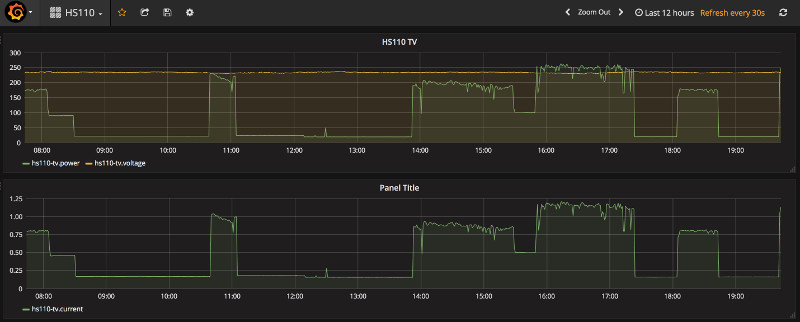
<p>If you want an example on how this could look in Grafana, here are two graphs I was able to quickly conjure up in Grafana.
<img src="/assets/grafana-hs110.jpg" alt="HS110 readings in Grafana" /></p>]]></content><author><name>Robert Baarda</name></author><category term="tplink" /><category term="hs110" /><summary type="html"><![CDATA[Just recently I’ve purchased a TP-LINK HS110 (the European/Dutch version) to get some more insight in how much power various devices in my household consume, especially in standby mode. To give a short description, the HS110 is a smart power plug which connects to your wifi network and can be controlled by a mobile app. Using the Kasa app you can control the smart plug i.e. turn it on or off, setup schedules and see realtime power consumption values.]]></summary></entry><entry><title type="html">Installing Grafana on the Raspberry Pi</title><link href="https://www.beardmonkey.eu/raspberrypi/grafana/2017/11/14/installing-grafana-on-the-raspberry-pi.html" rel="alternate" type="text/html" title="Installing Grafana on the Raspberry Pi" /><published>2017-11-14T19:30:00+00:00</published><updated>2017-11-14T19:30:00+00:00</updated><id>https://www.beardmonkey.eu/raspberrypi/grafana/2017/11/14/installing-grafana-on-the-raspberry-pi</id><content type="html" xml:base="https://www.beardmonkey.eu/raspberrypi/grafana/2017/11/14/installing-grafana-on-the-raspberry-pi.html"><![CDATA[<p><strong>UPDATE</strong> <em>October 16th 2019: Corrected several (copy/paste) mistakes and added some additional instructions.</em></p>

<p>Yesterday I tried to install ‘Grafana’ on my Raspberry Pi 2 but the process wasn’t as straightforward as installing a package through apt-get so I decided to write the process down in case anyone else decides to install Grafana on their Raspberry Pi.</p>

<p>If you don’t know what Grafana is, it’s a web-based environment in which you can create beautiful dashboards using all kinds of graphs, gauges etc. which are based on queries. Grafana is able to connect to a variety of datasources (mostly metric based databases) like Graphite, Prometheus, Elastic etc. Just take a look at their <a href="https://grafana.com/" rel="nofollow" title="Grafana">site</a> to get an impression of Grafana’s capabilities.</p>

<p>Ok, let’s get started.
My Raspberry Pi 2 is currently running ‘Raspbian 8 (jessie)’. This is what</p>

<figure class="highlight"><pre><code class="language-shell" data-lang="shell"><span class="nb">cat</span> /etc/os-release</code></pre></figure>

<p>gives me:</p>

<figure class="highlight"><pre><code class="language-plain" data-lang="plain">PRETTY_NAME="Raspbian GNU/Linux 8 (jessie)"
NAME="Raspbian GNU/Linux"
VERSION_ID="8"
VERSION="8 (jessie)"
ID=raspbian
ID_LIKE=debian
HOME_URL="http://www.raspbian.org/"
SUPPORT_URL="http://www.raspbian.org/RaspbianForums"
BUG_REPORT_URL="http://www.raspbian.org/RaspbianBugs"</code></pre></figure>

<p>To install Grafana (v4.6.1 at the time of writing) on the Raspberry Pi in Raspbian we need to build Grafana from source. Fortunately this is not difficult and is for the most part already described on the Grafana <a href="http://docs.grafana.org/project/building_from_source/" rel="nofollow" title="Build Grafana from source">website</a>. But first we need to get some essential tools/dependencies in place.</p>

<p>First we need to install the build-essential package, to do this run:</p>

<figure class="highlight"><pre><code class="language-shell" data-lang="shell"><span class="nb">sudo </span>apt-get update <span class="o">&amp;&amp;</span> <span class="nb">sudo </span>apt-get <span class="nb">install </span>build-essential</code></pre></figure>

<p>According to the documentation on the Grafana website, at this time of writing, Grafana needs at least Go1.9 to build an run. Unfortunately this isn’t available as a package through apt (the available package for Go is currently at v1.3), so we need to get it elsewhere. Google has binaries available for v1.9 which we can download and use. As described <a href="https://gist.github.com/konradko/a9468beb70f0fa47766f5ebf966f24e8" rel="nofollow" title="Gist">here</a> the steps are the following:</p>

<p>If Go is already installed through apt, remove it using the following commands:</p>

<figure class="highlight"><pre><code class="language-shell" data-lang="shell"><span class="nb">sudo </span>apt remove golang
<span class="nb">sudo </span>apt-get autoremove</code></pre></figure>

<p>Run the following commands to get the proper Go version and install it in /usr/local.</p>

<figure class="highlight"><pre><code class="language-shell" data-lang="shell">wget https://storage.googleapis.com/golang/go1.9.linux-armv6l.tar.gz
<span class="nb">sudo tar</span> <span class="nt">-C</span> /usr/local <span class="nt">-xzf</span> go1.9.linux-armv6l.tar.gz
<span class="nb">export </span><span class="nv">PATH</span><span class="o">=</span><span class="nv">$PATH</span>:/usr/local/go/bin</code></pre></figure>

<p>Next, we need to get the proper binaries for the latest NodeJS LTS version. These are available from the NodeJS website and can be retrieved and installed using the following commands.</p>

<figure class="highlight"><pre><code class="language-shell" data-lang="shell">wget https://nodejs.org/dist/v8.9.1/node-v8.9.1-linux-armv7l.tar.xz
<span class="nb">sudo tar</span> <span class="nt">-C</span> /usr/local <span class="nt">-xf</span> node-v8.9.1-linux-armv7l.tar.xz
<span class="nb">export </span><span class="nv">PATH</span><span class="o">=</span><span class="nv">$PATH</span>:/usr/local/node-v8.9.1-linux-armv7l/bin</code></pre></figure>

<p>To make sure the locations to the binaries are properly set in the $PATH environment variable check the versions for Go and NodeJS.
For Go run:</p>

<figure class="highlight"><pre><code class="language-shell" data-lang="shell">go version</code></pre></figure>

<p>This should give you something like:</p>

<figure class="highlight"><pre><code class="language-plain" data-lang="plain">go version go1.9 linux/arm</code></pre></figure>

<p>For NodeJS run:</p>

<figure class="highlight"><pre><code class="language-shell" data-lang="shell">node <span class="nt">-v</span></code></pre></figure>

<p>And this should give:</p>

<figure class="highlight"><pre><code class="language-plain" data-lang="plain">v8.9.1</code></pre></figure>

<p>Now, it’s more or less following the first steps for building from source as described on the Grafana website. I’ve created a ‘Go’ directory in my user’s home directory and set the $GOPATH variable accordingly.</p>

<figure class="highlight"><pre><code class="language-shell" data-lang="shell"><span class="nb">export </span><span class="nv">GOPATH</span><span class="o">=</span><span class="nv">$HOME</span>/go</code></pre></figure>

<p>During the build process I’ve encountered out-of-memory errors which I’ve resolved by setting the $GOMAXPROCS variable like so:</p>

<figure class="highlight"><pre><code class="language-shell" data-lang="shell"><span class="nb">export </span><span class="nv">GOMAXPROCS</span><span class="o">=</span>1</code></pre></figure>

<p>Download Grafana</p>

<figure class="highlight"><pre><code class="language-shell" data-lang="shell">go get github.com/grafana/grafana</code></pre></figure>

<p>Now you can start the build of the backend code by running the following commands (this takes a while):</p>

<figure class="highlight"><pre><code class="language-shell" data-lang="shell"><span class="nb">cd</span> <span class="nv">$GOPATH</span>/src/github.com/grafana/grafana
go run build.go setup
go run build.go build</code></pre></figure>

<p>Before we get to building the frontend part of the Grafana system we need to get a version of PhantomJS in place or else the frontend build process will fail. There is no official package available for arm system so we need to install an unofficial package. I used the unofficial package from <a href="https://github.com/fg2it/phantomjs-on-raspberry/tree/master/rpi-2-3/wheezy-jessie/v2.1.1" rel="nofollow" title="PhantomJS">https://github.com/fg2it/phantomjs-on-raspberry/tree/master/rpi-2-3/wheezy-jessie/v2.1.1</a>. As described on the README page just execute the following commands to install PhantomJS v2.1.1.</p>

<figure class="highlight"><pre><code class="language-shell" data-lang="shell"><span class="nb">sudo </span>apt-get <span class="nb">install </span>libfontconfig1 libfreetype6
curl <span class="nt">-o</span> /tmp/phantomjs_2.1.1_armhf.deb <span class="nt">-sSL</span> https://github.com/fg2it/phantomjs-on-raspberry/releases/download/v2.1.1-wheezy-jessie/phantomjs_2.1.1_armhf.deb
<span class="nb">sudo </span>dpkg <span class="nt">-i</span> /tmp/phantomjs_2.1.1_armhf.deb</code></pre></figure>

<p>And now you can build the frontend part by executing (this also takes a while):</p>

<figure class="highlight"><pre><code class="language-shell" data-lang="shell">npm <span class="nb">install</span> <span class="nt">-g</span> yarn
yarn <span class="nb">install</span> <span class="nt">--pure-lockfile</span>
yarn start</code></pre></figure>

<p>Now, if all went well you should be able to run:</p>

<figure class="highlight"><pre><code class="language-shell" data-lang="shell">./bin/grafana-server</code></pre></figure>

<p>and see the HTTP server firing up. To get started visit your raspberrypi through your webbrowser on port 3000</p>

<figure class="highlight"><pre><code class="language-plain" data-lang="plain">http://raspberrypi_address:3000/</code></pre></figure>

<p>and see the magic happen.</p>

<p>If you want Grafana to be automatically started whenever the operating system starts we need to load up a unit file in systemd. You can do this by creating a unit file in /lib/systemd/system, something like this /lib/systemd/system/grafana.service. Give the grafana.service file the following contents:</p>

<figure class="highlight"><pre><code class="language-plain" data-lang="plain">[Unit]
Description=Grafana
After=syslog.target

[Service]
Type=simple
User=pi
WorkingDirectory=/home/pi/go/src/github.com/grafana/grafana
ExecStart=/home/pi/go/src/github.com/grafana/grafana/bin/grafana-server
StandardOutput=syslog
StandardError=syslog

[Install]
WantedBy=multi-user.target</code></pre></figure>

<p>Execute the following command to let the grafana server start when the operating system starts:</p>

<figure class="highlight"><pre><code class="language-shell" data-lang="shell"><span class="nb">sudo </span>systemctl <span class="nb">enable </span>grafana.service</code></pre></figure>

<p>If you’ve enabled the service you can start it right away running the following command (If you’ve Grafana running already you might want to kill that first):</p>

<figure class="highlight"><pre><code class="language-shell" data-lang="shell"><span class="nb">sudo </span>systemctl start grafana.service</code></pre></figure>

<p>To see if the Grafana service has successfully started you can run:</p>

<figure class="highlight"><pre><code class="language-shell" data-lang="shell"><span class="nb">sudo </span>systemctl status grafana.service</code></pre></figure>

<p>When successful this should give something like:</p>

<figure class="highlight"><pre><code class="language-plain" data-lang="plain">grafana.service - Grafana
   Loaded: loaded (/lib/systemd/system/grafana.service; enabled)
   Active: active (running) since Sat 2017-11-14 20:28:16 CET; 7s ago
 Main PID: 8810 (grafana-server)
   CGroup: /system.slice/grafana.service
           └─8810 /home/pi/go/src/github.com/grafana/grafana/bin/grafana-server

Nov 14 20:28:17 raspberrypi2 grafana-server[8810]: t=2017-11-14T20:28:17+0100 lvl=info msg="Starting DB migration" logger=migrator
Nov 14 20:28:17 raspberrypi2 grafana-server[8810]: t=2017-11-14T20:28:17+0100 lvl=info msg="Executing migration" logger=migrator id="copy data account to org"
Nov 14 20:28:17 raspberrypi2 grafana-server[8810]: t=2017-11-14T20:28:17+0100 lvl=info msg="Skipping migration condition not fulfilled" logger=migrator id="copy data account to org"
Nov 14 20:28:17 raspberrypi2 grafana-server[8810]: t=2017-11-14T20:28:17+0100 lvl=info msg="Executing migration" logger=migrator id="copy data account_user to org_user"
Nov 14 20:28:17 raspberrypi2 grafana-server[8810]: t=2017-11-14T20:28:17+0100 lvl=info msg="Skipping migration condition not fulfilled" logger=migrator id="copy data account_user to org_user"
Nov 14 20:28:17 raspberrypi2 grafana-server[8810]: t=2017-11-14T20:28:17+0100 lvl=info msg="Starting plugin search" logger=plugins
Nov 14 20:28:18 raspberrypi2 grafana-server[8810]: t=2017-11-14T20:28:18+0100 lvl=info msg="Initializing Alerting" logger=alerting.engine
Nov 14 20:28:18 raspberrypi2 grafana-server[8810]: t=2017-11-14T20:28:18+0100 lvl=info msg="Initializing CleanUpService" logger=cleanup
Nov 14 20:28:18 raspberrypi2 grafana-server[8810]: t=2017-11-14T20:28:18+0100 lvl=info msg="Initializing Stream Manager"
Nov 14 20:28:18 raspberrypi2 grafana-server[8810]: t=2017-11-14T20:28:18+0100 lvl=info msg="Initializing HTTP Server" logger=http.server address=0.0.0.0:3000 protocol=http subUrl= socket=</code></pre></figure>]]></content><author><name>Robert Baarda</name></author><category term="raspberrypi" /><category term="grafana" /><summary type="html"><![CDATA[UPDATE October 16th 2019: Corrected several (copy/paste) mistakes and added some additional instructions.]]></summary></entry></feed>